Most practice networks were not designed. They accumulated. A router from the original fit-out, a switch added when the third exam room went in, an access point someone mounted where the signal seemed weakest, and a printer that only works if nobody reboots anything. It holds until the day it does not, and then it fails during clinic hours with a waiting room full of people.
AiTek Solutions designs and builds network infrastructure for medical practices across the Chicago western suburbs. The work covers the physical plant (cabling, switching, wireless) and the logical design that decides what can reach what. In a practice, that second part carries more weight than most owners realize, because a single flat network puts your clinical systems on the same footing as the tablet in the waiting room.
What the work covers
- Structured cabling. Drop locations planned against the floorplan and the clinical workflow, terminated and labeled to a standard, documented so the next person can read it.
- Switching. Sized for what the practice actually runs, with the port capacity and power budget to add rooms later without replacing the core.
- Wireless. Coverage designed for a clinical floorplan, which is a different problem from an office (more on that below).
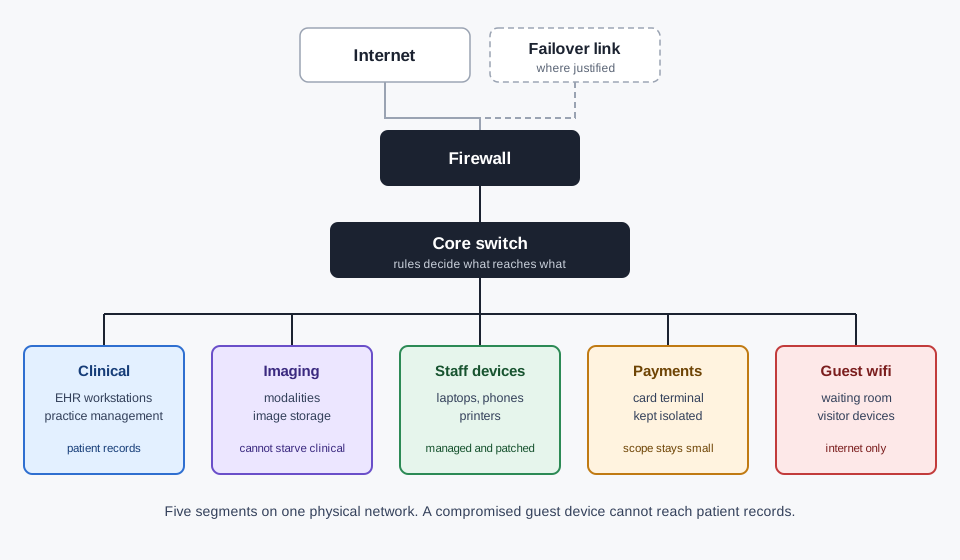
- Segmentation. The logical separation of clinical systems, imaging, staff devices, guest wifi and payment traffic.
- Redundancy and failover. What happens when the primary link drops, decided in advance rather than during the outage.
- Documentation. Diagrams, an address plan, labeled ports and a record of what is connected where. The thing you own at the end.
Why one flat network is the problem
In a typical practice, the same physical network carries clinical systems holding patient records, imaging devices sending large files, staff laptops, a guest wifi network for the waiting room, a payment terminal, and increasingly a handful of connected devices nobody inventoried: a smart thermostat, a security camera, a TV.
On a flat network, all of those can reach each other. That matters for three reasons, and only the first is the one people expect.
Security. The waiting-room tablet and the machine holding patient records should not be able to see each other. If a guest device is compromised, segmentation is the difference between an incident and a breach. This is also what a HIPAA risk assessment asks about: not whether you have a firewall, but who can reach protected health information.
Performance. An imaging modality pushing a study across the network will degrade everything sharing that path. On a flat network, a scan can slow the system a clinician is typing into. Separation means the imaging traffic cannot starve the clinical traffic.
Scope. Anything that touches payment data brings compliance obligations with it, and the cheapest way to manage that is to keep payment traffic isolated so the obligation does not spread across every device in the building.
The fix is not expensive hardware. It is design: deciding the segments, writing the rules between them, and documenting it. Most of the cost of getting this wrong is in doing it twice.
New build versus retrofit
These are genuinely different projects, and it is worth being honest about which one is cheaper.
During a build, the network is designed alongside the floorplan. Drop locations get decided while walls are open, the imaging room gets the power and the pathway it needs, and the segmentation is built in from the first device. This is the cheapest version by a wide margin, and it is why we run practice buildouts as a single project rather than handing a finished space to an IT provider.
In an existing practice, we start with an assessment, because the first requirement is an accurate picture of what is actually there, which is rarely what the previous provider's documentation says. From there, re-architecting usually happens in stages, scheduled around clinic hours, with the segmentation introduced before the physical work rather than after. Some of it can be done logically without opening a wall. Some of it cannot, and we will tell you which is which before you commit.
Wireless in a clinical space
An office wireless design assumes drywall, desks and laptops. A practice breaks most of those assumptions.
Imaging rooms are often shielded, which stops signal at the doorway rather than attenuating it gradually, so coverage has to be planned room by room instead of from a heat map. Device density is higher than headcount suggests, because a practice runs tablets, handhelds, connected equipment and staff phones in the same space. Equipment moves between rooms and has to roam without dropping a session mid-task. And the waiting room needs guest coverage that reaches patients without reaching anything else.
None of that is solved by adding access points. It is solved by surveying the actual space, placing for the floorplan you have, and keeping the guest network logically separate from everything else.
What happens when the link goes down
Every practice eventually loses its internet connection. The question is whether that was planned for.
We design for the failure cases that matter in a clinical setting: which systems have to keep working with no outside connection, which can queue and reconcile later, and whether a secondary path is worth its monthly cost for your specific practice. For some, a failover connection is clearly justified. For others it is not, and the honest answer is a documented manual process instead. We would rather tell you that than sell redundancy you do not need.
How a project runs
- Assessment. What exists, what it is doing, where the credentials are, and what is undocumented. For a retrofit this is the whole first phase and it is not skippable.
- Design. Segment plan, address plan, hardware list, drop schedule, wireless placement. You see this and approve it before anything is ordered.
- Build. Cabling and installation, scheduled around clinic hours for an existing practice, or against the construction schedule for a new one.
- Cutover. Moving onto the new design, planned for the lowest-impact window your schedule allows.
- Handover. Diagrams, address plan, labeled ports, and a walkthrough with whoever will be your first call.
Common questions
Can you fix our network without opening walls?
Often a meaningful part of it, yes. Segmentation, switching, addressing and wireless placement can usually be reworked without construction. Adding drops in rooms that never had them cannot. The assessment tells you which category your problem is in before you commit to anything.
Do we need to replace all our hardware?
Usually not all of it. Switching and access points that are current and adequately specified can often stay. What gets replaced is whatever cannot support the segmentation or has reached end of support, because a device that no longer receives firmware updates is a liability regardless of whether it still works.
How does this relate to HIPAA?
Segmentation is one of the clearest technical answers to the access-control questions a risk assessment asks. It does not make you compliant on its own. That needs the policies, the documentation and the monitoring too, which is cybersecurity and HIPAA compliance. But a flat network is very hard to defend in an assessment, and segmentation is usually the first thing we change.
Will you work with our existing internet provider and EHR vendor?
Yes, and coordinating between them is part of the job. Most network problems in a practice turn out to be three vendors each saying the issue is one of the others. Owning that coordination is part of managed IT support.
Can you do this during a buildout instead?
That is the cheaper path and the one we prefer. See practice buildouts.
Not sure what your network is actually doing?
Most practices are not, and the assessment is where this starts. We will tell you what is there, what the real risks are, and which fixes need construction and which do not, before anyone talks about hardware.